MCP vs CLI: Why We Built Both (And When to Use Each)
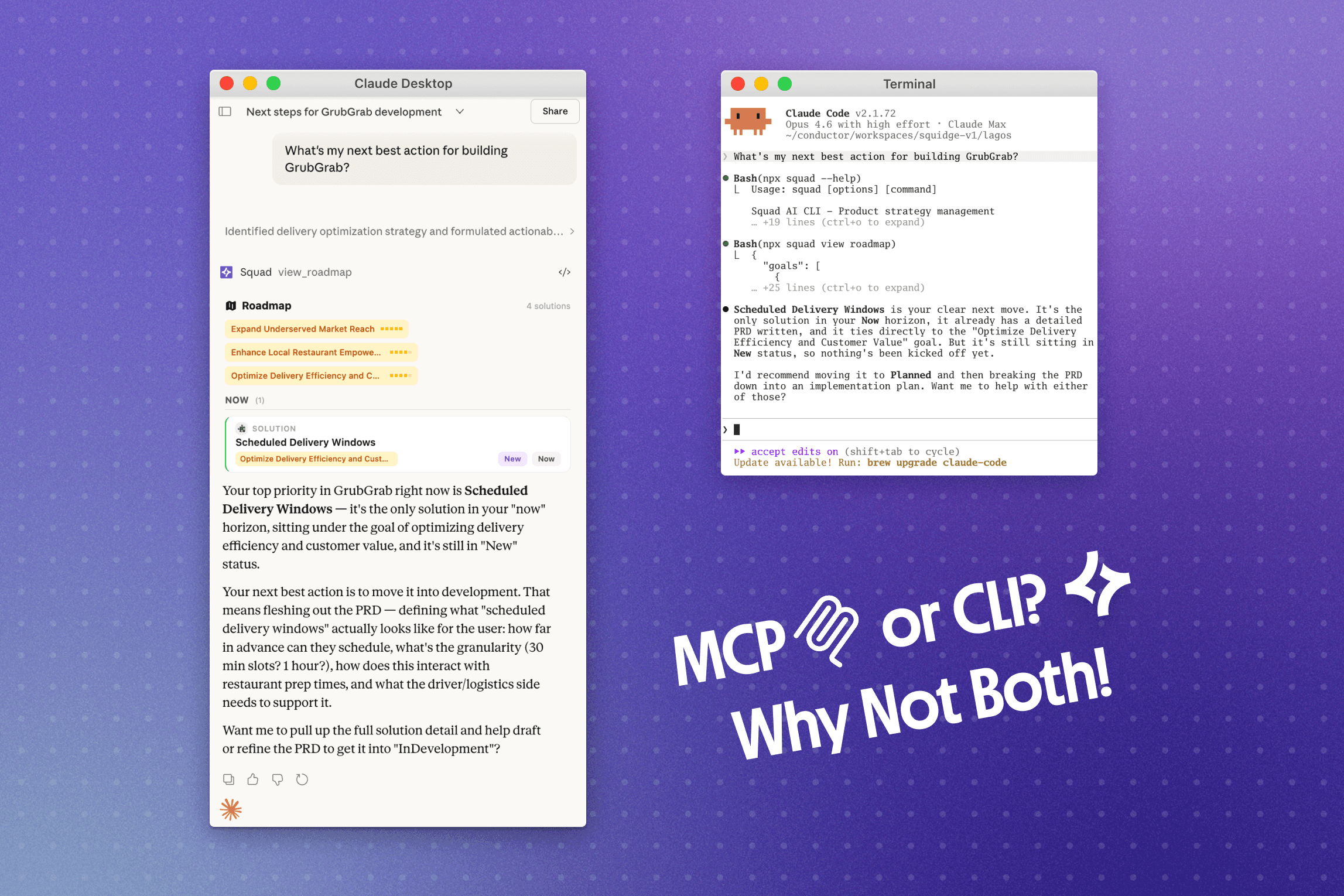
We just shipped a remote MCP server and a CLI for Squad. Both are powered by the same OpenAPI spec for Squad's API: the same data source, yet two very different integration surfaces. Building both changed how we think about picking tools when AI agents are the primary consumer.
How Do You Choose Tools When AI Is the User?
When we evaluate libraries, we look at the usual things: docs, bundle size, maintenance, API design. We've started adding another: how much of this library exists in AI training data?
It sounds reductive. But it showed up in two decisions we made.
For the CLI, we chose Commander.js over citty. citty has a cleaner API in some respects, and if we were just optimising for our own DX we might have gone with it. But Commander is one of the most used CLI frameworks in the Node ecosystem. AI agents have seen thousands of Commander-based CLIs in training. When we tested both, agents produced noticeably better integrations with Commander. Fewer hallucinated flags, better subcommand structure, less hand-holding needed. citty, being newer with fewer examples in the wild, led to worse output.
For the MCP server, we chose mcp-use (~9,500 stars), the most widely adopted MCP framework. Same logic: agents building against our server encounter patterns they've seen before. The framework handles transport, session management, and OAuth plumbing out of the box.
When we pick an open source project to build on, we try to be good citizens of it. That means using it seriously, and contributing back when things break. Running mcp-use in production surfaced edge cases that don't show up in local dev: session recovery failures after deploys, broken auth context in tool callbacks, build toolchain OOMs with complex generated types. Rather than just working around these, we filed issues with root cause analysis and suggested fixes. The maintainers resolved every one within days. After the third, one of them invited us to hop on a call. That's the kind of relationship we want with the tools we depend on. The MCP ecosystem is moving fast, and the projects powering it get better when the teams running them in production take the time to report what breaks and why.
In the end, both framework choices came down to the same question: how well can an AI build with this? If you're shipping products where AI agents are contributing meaningful amounts of the code, your dependency choices impact your velocity: training data coverage is a dependency now, whether we like it or not.
Why Do Agents Prefer the Terminal?
When an agent sees squad opportunity list --format json, it already knows the pattern. CLI tools are all over the training data. There's no schema to parse, no protocol to negotiate. The agent just runs a command.
Token cost is part of it too. A single MCP server can burn tens of thousands of tokens loading tool schemas into context before a tool is even called. A CLI call costs around 200 tokens. In agentic loops that adds up.
Agents also compose CLI commands the way developers do. Chain squad opportunity list | jq -r '.[0].id' | xargs squad opportunity generate-solutions to grab the top opportunity and kick off solution generation in one shot. Standard piping, nothing the agent hasn't seen before.
What If I Use A Web Based Agent?
The CLI assumes the agent has shell access. Claude Code, Cursor, Windsurf, a custom runtime. But a product manager asking Claude Desktop "what are our top opportunities?" doesn't have a terminal. They shouldn't need one. MCP gives conversational interfaces a way to call Squad tools natively, inside that environment.
Squad's MCP server exposes 30+ tools across opportunities, solutions, goals, feedback, insights, and more. Each tool has a typed JSON schema, so the agent discovers what's available and calls it correctly without reading docs. Safety annotations (readOnlyHint, destructiveHint) and input validation are built in. Like the CLI, auth is OAuth with automatic token refresh and team-level access control.
How Do They Compare?
Jannik Reinhard's analysis quantifies the gap well. For an Intune compliance task, the MCP approach consumed ~145,000 tokens vs ~4,150 for CLI. A 35x difference. The bulk of that cost isn't the tool calls themselves. It's the schema. A single GitHub MCP server loads ~55,000 tokens of tool definitions into context before the agent does anything. That's half of GPT-4o's context window gone on overhead.
CLI tools pay zero upfront. The agent already knows gh, az, docker. Those patterns are baked into the training data, not injected at runtime. Jannik measured 95% of the context window remaining for reasoning with CLI, versus a fraction of that with a typical MCP stack. Context preserved is reasoning capacity preserved.
Both have discoverability, they just pay for it differently. MCP schemas load automatically into context, giving the agent a full map of available tools upfront. That's useful, but it's also the reason for the token cost. CLI tools provide the same information on demand via --help. An agent that needs to know what squad opportunity can do runs squad opportunity --help and pays for those tokens only when it actually needs them. In practice, agents rarely need to discover tools they already know from training.
Composability is where CLI pulls ahead. Agents chain commands the same way developers do. Jannik's post includes an example of an agent autonomously composing mgc, az, and PowerShell into a multi-step compliance pipeline, piping JSON between tools without any orchestration layer. MCP can't do this natively. Each tool call is a discrete request-response cycle; the agent has to manage intermediate state and translate response formats between calls. For multi-step workflows, that overhead compounds.
Auth is a non-factor for us. Both our CLI and MCP server use OAuth. The CLI uses the device token flow: your browser opens, you log in, accept the scopes, and JWT access/refresh tokens are saved to a dotfile in your config directory. The MCP server does the same dance via standard OAuth. Either way it's transparent to the user, and teams can manage access from their Squad settings. This won't always be true for every product, but when you control both surfaces, there's no reason for the auth experience to differ.
Environment is the real dividing line. Everything else is optimisation. The CLI needs a terminal. MCP doesn't. If your user is in Claude Desktop or ChatGPT, the CLI isn't an option regardless of how many tokens it saves. If your user is in Claude Code or Cursor, CLI is almost always the better choice. Most products serve both kinds of users.
Error recovery. CLI failures come back as exit codes and stderr. Models handle these well because they've seen millions of failed commands in training. MCP errors are structured JSON with error codes. More parseable in theory, but agents are less practised at recovering from them. We've seen agents retry failed CLI commands with corrected flags more reliably than they retry failed MCP calls.
They share an API, so the data is the same either way. We use both ourselves. If you're building developer-facing AI tools and can ship both, it's worth doing. They genuinely serve different users in different contexts.
Try them out for yourself:

Steven Crake
Squad’s building towards a world in which anyone can develop and manage software, properly.
Join us in building user-centric products that deliver on your bottom line.